Your team. On the same page.

Turn your game plan into something everyone can see, understand, and execute. Plays, rosters, playbooks, and game-day tools, all in one place.

Join thousands of
coaches and players.

300,000+Members
11,000+Plays
100+Playbooks
6,000+Favourites
Your team, from practice to the final point

A plan for the play.
A home for the team.

Bring your roster, schedule, and plays together. Then take the tools you need onto the sideline.

01 / Smart lines

Know who goes on next.

Pick a saved line, swap a player or two, and send them out. Keep the change just for that point, or update the saved line for next time.

  • Turn on fair-shift suggestions to see who is due a turn
  • Choose from the players checked in for this game
  • Track shifts and see how evenly they are spread
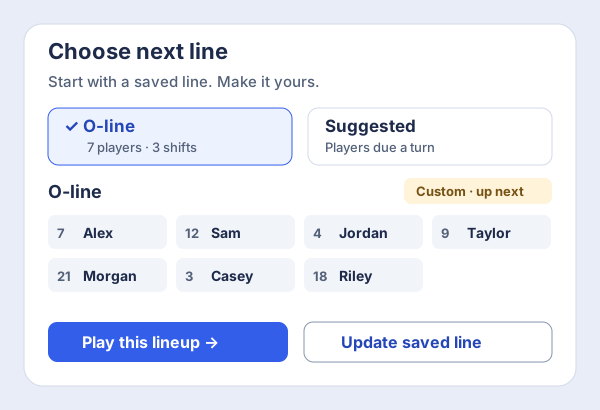
Lineup example showing a saved O-line, a suggested line, and a custom seven-player lineup with options to play it or update the saved line.
Start with a line. Adjust it for the moment.
02 / Game day

Less admin.
More eyes on the game.

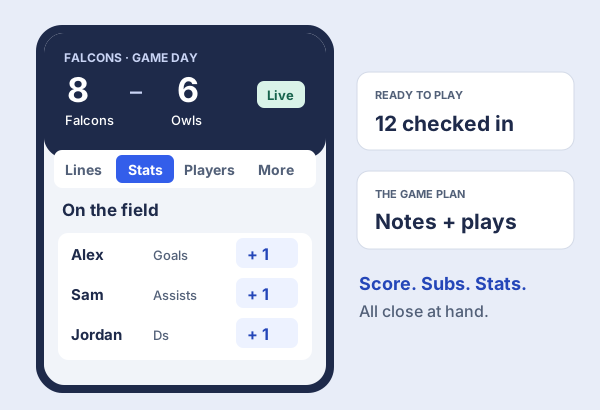
Check in your players, keep the score, and manage lines or substitutions from your phone. Your game plan and attached plays are close by when you need them.

  • Move between lines, stats, and players with clear navigation
  • Record player stats with a tap as the game unfolds
  • Keep pre-game plans and post-game notes with the game
Mobile game-day example with an 8–6 score, navigation for lines, stats and players, and quick stat controls alongside attendance and game-plan reminders.
Built for the phone in your hand.
03 / Stats & season review

See the game.
See the bigger picture.

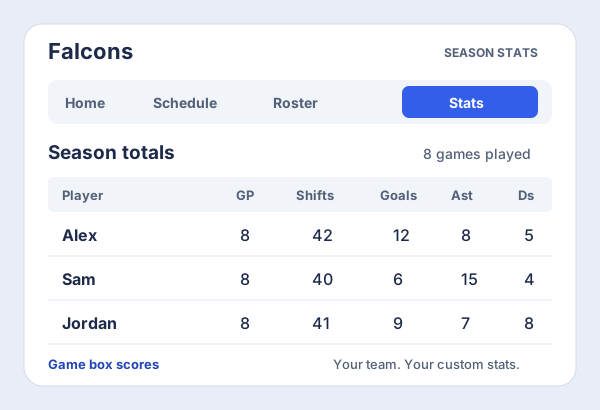
Review a game’s box score, then look across the season. See games played, shifts, and player totals in one place, with columns you can sort to explore the numbers.

  • Use the default stats for your team’s sport
  • Review finished games and season totals on a larger screen
  • Add custom stats on the Coach plan to track what matters to you
Season stats example with player rows and columns for games played, shifts, goals, assists and defensive plays.
From each player’s contribution to the season so far.
04 / Play Strategy

Off the screen.
Onto the field.

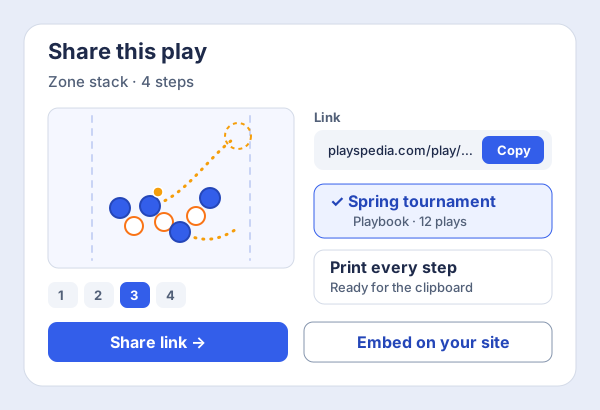
Share a play with a link, collect it in a playbook, or print every step for your clipboard. Keep the plan close at hand.

  • Share any play with a link, or embed it on your own site
  • Group plays into playbooks for drills, tournaments, or a season
  • Print every step cleanly for the clipboard
Share panel for a four-step play, with a link to copy, the play saved to a Spring tournament playbook, a print option, and an embed button.
One play, wherever your team needs it.

Get your team ready for the next game.

Add players by name. They don’t need their own accounts.

Start your team for free
TRY A LIVE PLAY Standard Stack
Press Play. See the plan unfold. Open play
The Playmaker

Show the play. Make it click.

Give every player a clear picture of where to go and when. Turn a static diagram into a step-by-step walkthrough your team can replay.

  • Draw routes by moving your players
  • Step-by-step animation of every play
  • Branch into alternate scenarios mid-play
How it works

Your first play in five steps

Try it right here before you sign up. Your play is saved when you create your free account.

  1. 1

    Pick your field

    Choose a playing area and a starting setup for your sport.

  2. 2

    Add players

    Put offense and defense on the field and drag them into place.

  3. 3

    Add a step

    Each step is a moment in the play. The next one starts where the last one ended.

  4. 4

    Drag to draw the route

    Move a player on the new step and the route draws itself.

  5. 5

    Press Play and save

    Watch it animate, give it a name, and save it to your plays.

Multi-sport

Pick a playing area. Start drawing.

59 playing areas across 7 sports, drawn to real proportions and markings. Filter by sport, pick one, and the field is ready before you place a single player.

Room to grow with your team

Everything you need, from the whiteboard to game day

Animated plays

Draw routes step by step and get a clean animation your team can replay.

Branching plays

Split any step into what-ifs so players learn the read, not just the script.

Playing area templates

Real fields and courts for every sport, from full field to end-zone drills, with new areas added over time.

Playbooks

Group plays into playbooks for drills, tournaments, or a season, and share them with the team.

Team rosters

Add players by name, no accounts needed. Edit numbers and positions, keep inactive players on file.

Game day

Attendance, score and stats by tap on a phone, with the plays you want for the game a swipe away.

Lines, subs and shifts

Run lines or a bench, put players on and off, and log shifts so playing time stays fair.

Stats and reports

Season totals, per-game box scores, and your own custom stats for the things your team cares about.

Print and share

Print every step cleanly for the clipboard, or share plays with a link and embed them anywhere.

Community plays

Explore thousands of plays shared by other coaches, filtered by sport and type.

Favourites

Save the community plays you like into your own collection for quick access.

Any device

Works in the browser on phones, tablets and laptops. Nothing to install for you or your players.

Membership

Start free. Grow with your team.

Rookie
$0.00/ month
Rookie plans let you try out Playspedia.
  • 1 public play
  • 4 steps per play
  • 1 team with unlimited players
  • Game day: attendance, score, stats & shifts
  • Season stats
  • Support for all sports
Try it for free!
Captain
$2.99/ month
Full access to the core Playspedia toolset.
  • 25 private plays
  • Unlimited public plays
  • Unlimited steps per play
  • 10 playbooks
  • 2 teams with unlimited players
  • Sharing with embed codes
Join Now!
Make your next practice count

One clear play can change the way your team plays.

Create a play for free →